Setting Sort Order on Forms
Introduction
Admin's can now designate the sort order on certain form types so that when customers complete form information; the forms are displayed in the order dictated by the admin.
Getting Started
To manage the sort order of forms navigate to Settings > Assignments > Forms
Sort order of forms applies to the Product and Product Participant form types.Sort Order for Forms
When creating a new form there is an option to set the sort order for that specific form.
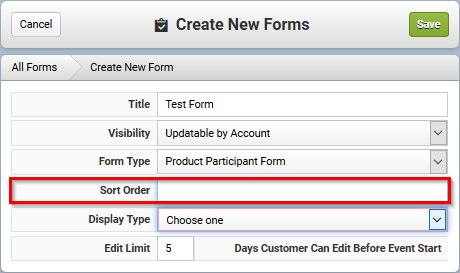
Determining the sort order of forms will change the order in which the questions from each form are presented on your cart and checkout pages.
The participant form will always be the first form that is displayed, any Product and Product Participant forms assigned will be ordered by the sort order that is set on each form.
The participant form will always be the first form that is displayed, any Product and Product Participant forms assigned will be ordered by the sort order that is set on each form.
For single page checkout, the forms are presented by their assigned sort order below the participant details and Participant form.
For non-single page checkout, the forms are presented first by type of form, and then by sort order at the forms step during checkout. After the participant form; the product participant form(s) will be displayed, then product form(s). The Product Participant and Product forms will honor the sort order within each form type that was set by the admin.
Editing the sort order of an existing form
Updating an existing form or cloning a form with no sort order set will automatically set the sort order to the next highest value.
6/2019
Related Articles
Creating Forms
You can create various types of Forms in the system: Account Form: Whenever an Account is created, this form may be completed and the information will be stored for that account. This form type is not product specific. Only one form of this type may ...Triggered Daily Order Actions
Overview You can create Triggered Emails to be fired sent including certain daily actions (such as order created, discount added, and more). These emails can be grouped to show all actions for the day in a single email, or by account, or by order or ...Triggered Order Emails
Overview You can create Triggered Emails for Orders. The email can be triggered to fire off of the Order Date, or the Start and End Dates of Events in the Order. You can choose to only send the email when there is an unpaid balance. For example, you ...Admin Order Confirmation
Introduction Configio not only sends automatic email confirmation messages to your customers, but also allows you to send a separate confirmation message to specific administrative users. Example You want to send an email to your fulfillment ...Setting up your CyberSource Gateway
To add your CyberSource Gateway account to your database, you will first need the following credentials: - Merchant ID - SOAP Security Key You need your Merchant ID to login to the CyberSource portal. Make note of this ID for use in Configio. Login ...