Organization Custom Fields
Introduction
When editing an organization you have the option to use 10 separate custom fields.
Getting Started
There are some configurations available that allow you to change the labels of the organization custom fields in the Customer Relationship Manager section.
Navigate to Settings > Setup > Configuration and do a search for "label for crm". This will bring up all the custom labels you can change for the CRM organization custom fields.
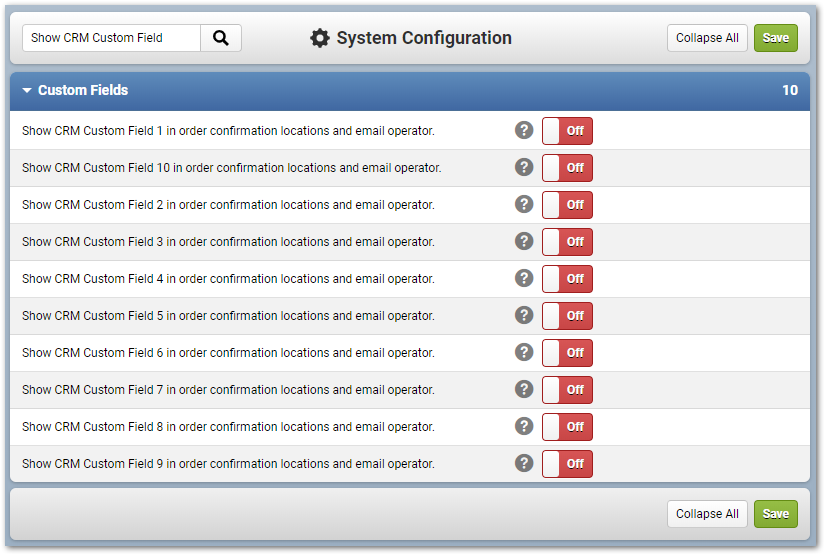
You can also configure the option to show the CRM custom fields in the order confirmation locations and email operators. Search for "show CRM custom fields" to enable these options.
Enabling Custom Fields via the Theme Builder
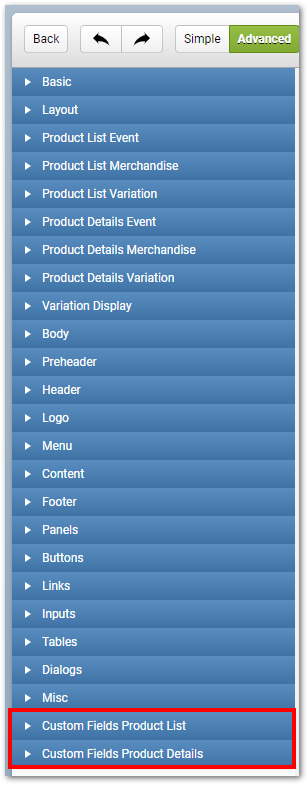
To display the custom fields on the cart side you must enable them through the Theme Builder. Navigate to Settings > Setup > Theme Builder. Choose your theme to edit. The Custom Fields Product List and Custom Fields Product Details are where you need to enable these fields so that they are displayed in the Cart Search and Details section.
Custom Fields in Emails
When sending emails that are product based you can add the organization custom fields into your emails. There are individual operators for these fields in email types that resolve to a single product (product reminders, triggered product purchased, order participant confirmations, etc.) For example when creating a Product Reminder email you can insert the custom CRM fields into the body of your email.
Custom Fields in Reports
The CRM custom fields 1-10 have been added to the Organization Data Set for reports.
06/2019
SKU: COKB
Related Articles
Syncing Organization Location and Primary Address
Introduction Turn on to automatically create a location form the organization's primary address. Getting Started Login to the Administrative Console of your database, click on "Settings" > Setup > Configuration, and click on then search for "Create a ...Organization Funds
Overview Organization Funds have been developed, under the Customer Relationship Management system, to allow purchases in Configio to be made with Funds from a particular Organization. Individual purchases may be controlled with amount limits and ...Organization Landing Page
Introduction Cart Landing Pages allow for products from an organization to be grouped together. The pages can be personalized with header and footer text. You can also personalize it with a custom Theme. Note: Your database must be in Organization ...Organization Allotments - DRAFT
Introduction You may now assign allotments to an organization, for certain products . These are essentially a predetermined number of discounts added to a product and assigned to an organization. Getting Started There is an Allotment tab displayed in ...Coordinator Access
Introduction Coordinators are shopping cart users (as opposed to administrative users) who have special access to data and tools that other regular shopping cart do not have. Coordinators are members of organizations who may need information about ...