Google Analytics
Overview
Google Analytics is a web service that tracks and reports on website traffic. Google Analytics Tracking IDs can be added a System Configuration, as shown in this article, or they can be added to individual Products.
Getting Started
To add Google analytics go to Settings > Configuration.
Enter “google” as a keyword search in the upper, left-hand corner text box and hit Enter.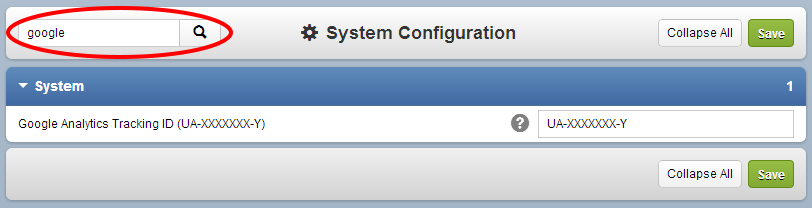
Create a new property in Google Analytics. Note: "Do not use existing account with a different domain!" Under “Google Analytics Tracking ID (UA-XXXXXXX-Y)” enter the Tracking ID and click Save.
Use the URL http://mycustomdomain.configio.com/sitemap.aspx to use the Site Map in Webmaster Tools!
Sitemaps help Google discover pages on your site our crawlers might otherwise miss. The Sitemap Details page in Webmaster Tools displays detailed information about each of the Sitemaps (including Sitemap index files) you've submitted to Google. Indexing stats are updated periodically, usually every few days, and the indexed number is a close approximation of the URLs in Google's index. View the Sitemap documentation page for more info about Webmaster Tools and SEO Management.
Related Articles
Analytics Overview
Introduction You can use Google Analytics, Google Tag Manager, and Facebook Pixel to help you better understand how your customers use your website. Analytics can be added as a system configuration, or they can be added to individual products.Analytics Tracking on Individual Products
Introduction You can set individual analytics tracking on a per-product basis. These analytics can be used in conjunction with your database wide analytics data; and in cases of multiple analytics IDs all of the appropriate IDs are provided to the ...Google Tag Manager
Overview Google Tag Manager allows convenient management of tracking and marketing optimization tags on a website. You can add a Tag ID as a System Configuration. This is covered in this article. You can also add them to Products. Getting Started If ...Facebook Pixel
Introduction Your database is integrated with Facebook pixel, which enables you to "measure, optimize and build audiences for your Facebook advertising campaigns, and to leverage the actions people take on your website across devices to inform more ...